Creating Tiled Sand in Photoshop 6.0
Dated: 11 July 2005
Author: Jason Gonzalez
Since this tutorial was designed to work originally for Photoshop 6.0 and up, I used version 6.0 as the tool to create our images. However, this tutorial can be adapted for the latest versions of Photoshop, provided that it features the same tools used here.
Since I used a Macintosh for this tutorial, Windows specific keyboard shortcuts are listed in parenthesis. Screenshots will be provided as necessary.
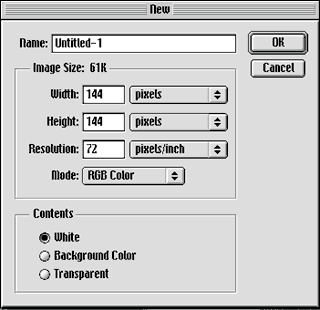
- First, we open a New file at 144 x 144 pixels (2" x 2") and make the resolution 72 dpi.
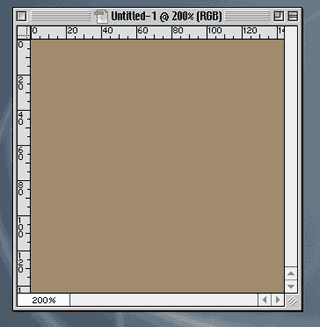
- We might also want to zoom in to about 200% using Command (Ctrl) +
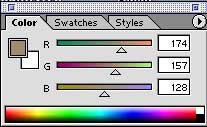
- We will then mix a color that looks like sand using RGB or CMYK sliders. I used RGB and came up with R=174, G=157, B=128. That color automatically becomes the foreground color
-
- Using the Paint Bucket
 tool, we fill in the box with the foreground color
-
- We might want to create a new swatch of the foreground color to recall later. In the "Swatches" tab, click an empty area. A dialog box will come up. We have the option of naming the swatch and clicking "OK"
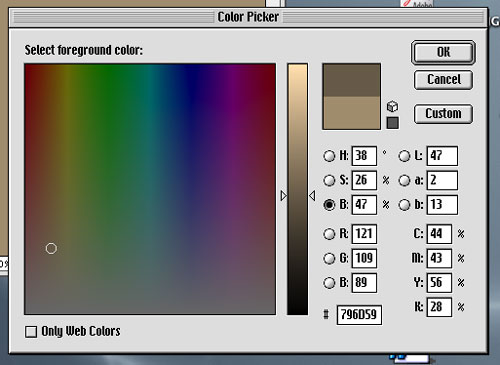
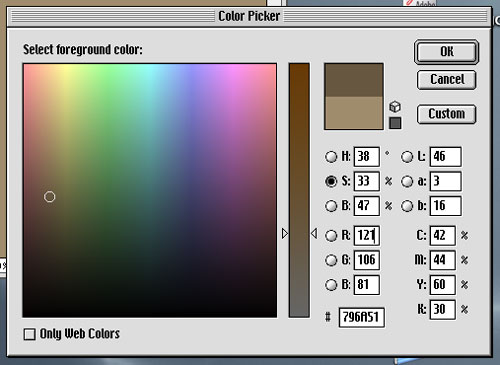
- Next, we click on the foreground color
 swatch to bring up the Color Picker
- We can adjust the “B” (brightness) slider down for a darker version of the sand color. I used 47.
- And we may adjust the color’s saturation also using the “S” button. I used 33
- We can adjust the “B” (brightness) slider down for a darker version of the sand color. I used 47.